(Part 2) Why Control Matters in Production AI Agents
Move beyond agent frameworks to build production-ready AI systems. Learn why owning your prompts, context windows, and control flow is essential for reliable agents.
(Part 2) Why Control Matters in Production AI Agents
In the previous post, we looked at how the Model Context Protocol (MCP) offers a lightweight, composable way to integrate LLMs with external systems. We saw how easy it is to get started—using libraries like Pydantic AI—to spin up demos and validate ideas fast.
But real-world systems demand more than convenience. They need reliability, debuggability, and control. You can't afford to ship an agent that "sort of works" in production. You need to know why it's choosing a certain tool, what it's doing step-by-step, and how to intervene when things go off track.
This blog picks up where we left off. We'll dig deeper into how agents actually work—under the hood—and why owning the full stack of prompt, tool, and execution logic is not a luxury, but a necessity.
So what's an agent really?
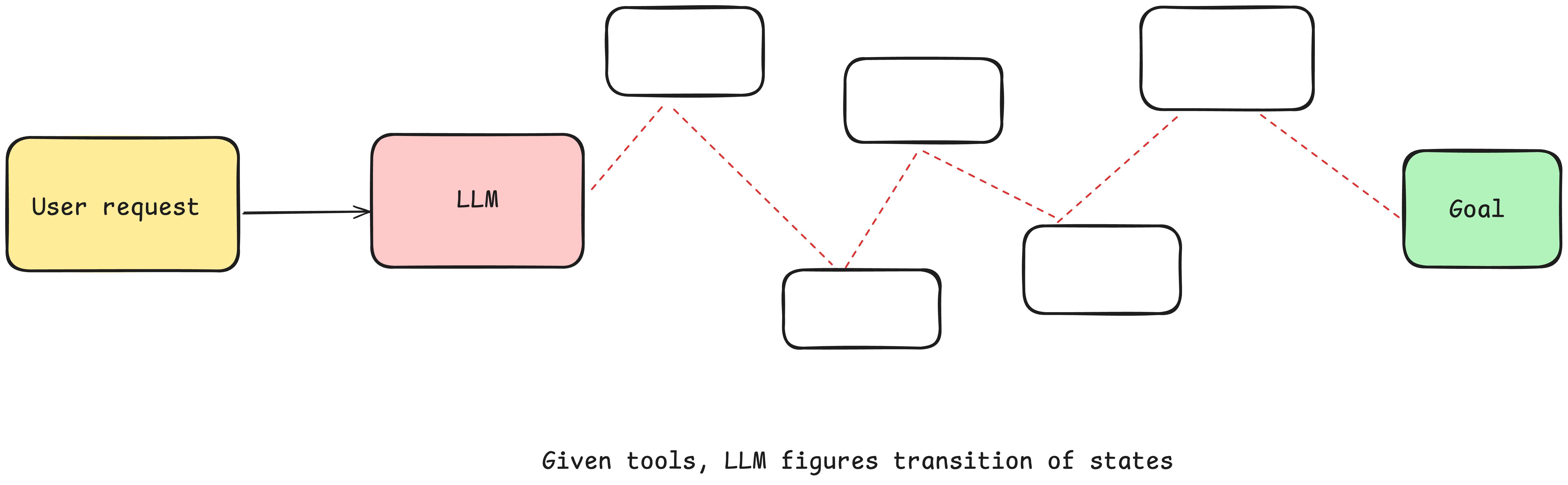
At its core, an agent's job is to fulfill a goal by reasoning through a task, selecting tools, and deciding what to do next—step by step.
You can give the agent a goal and a set of transitions: And let the LLM make decisions in real time to figure out the path
That process typically revolves around three components:
-
prompt - Tell the LLM what tools it has and how to behave. Get back JSON describing the next action from LLM
-
switch statement - based on the JSON that the LLM returns, decide what to do with it.Maybe MCP calls an external API
-
control tracking- store the list of steps that have happened and their results
-
for loop- Add the result of the switch statements to the context window and ask LLM to choose next step until the LLM says "done" or hits a terminal condition.
Natural Language to Tool Calls
One of the most common patterns in agent building is to convert natural language to structured tool calls. This is a powerful pattern that allows you to build agents that can reason about tasks and execute them.
This pattern, when applied atomically, is the simple translation of a phrase like
I need to book a deluxe room for 2 adults and 1 child from March 15-18, 2024. Can you check availability and rates for Mariott, London?
to a structured object that describes a booking call api like
{
  "function": {
    "name": "create_hotel_booking",
    "parameters": {
      "hotel_id": "mar_lon_park",
      "room_type": "deluxe_king",
      "check_in": "2024-03-15",
      "check_out": "2024-03-18",
      "guests": {
        "adults": 2,
        "children": 1
      },
      "rate_code": "BAR",
      "total_amount": 897,
      "currency": "GBP",
      "special_requests": "Early check-in requested",
      "confirmation_email": "guest@example.com"
    }
  }
}
From there, deterministic code picks up the payload and does the actual work — calling APIs, querying databases, or executing business logic.
from fastmcp import Client
client = Client(server_url)

async def example():
    async with client:
        tools = await client.list_tools()

        print(type(tools[0]))
        res = await client.call_tool_mcp(
            "create_hotel_booking",
            {
                "hotel_id": "mar_lon_park",
                "room_type": "deluxe_king",
                "check_in": "2024-03-15",
                "check_out": "2024-03-18",
                "guests": {"adults": 2, "children": 0},
            },
        )
        return res
This is where MCP (Model-Context Protocol) shines. It gives you a reliable, standardized interface for tool execution—ensuring that once your LLM picks a tool and fills the payload, your code can follow through with no ambiguity.
Black box agent framework
Some frameworks provide a "black box" approach This works for demos, but you're trading convenience for control. You can't debug decisions, modify prompts, or optimize for your specific use case.
agent = Agent(
  role="...",
  goal="...",
  personality="...",
  tools=[tool1, tool2, tool3]
)

task = Task(
  instructions="...",
  expected_output=OutputModel
)

result = agent.run(task)
Taking Control: The Four Pillars
1. Control your prompt
Your prompt is the primary interface between your application logic and the LLM. It controls not just how the model thinks, but what it chooses to do next. The number of steps the agent takes, the decision it takes to select the next action, and the quality of its decisions all depend on the prompt you give it.
Tool selection, in particular, improves significantly when you include few-shot examples—especially for edge cases, scenarios requiring user-specific context, or when the tool descriptions alone are ambiguous. A well-crafted prompt isn't just instructions; it's a working spec for how your agent should behave.
async def determine_next_step(prompt: str) -> Event:
    """
    Calls the LLM to determine the next Event based on the current prompt.
    """
    try:
        print(f"\nDetermining next step with prompt:\n{prompt}")  # Debug print

        response = await client.chat.completions.create(
            model="gpt-4o",
            response_model=Event,
            messages=[
                {
                    "role": "system",
                    "content": (
                        "You are an event-driven assistant that helps with git operations. "
                        "Based on the current context, determine the next appropriate action. "
                        "Valid event types: perform_action, fetch_data, request_clarification, done_for_now, error. "
                        "Always consider the previous actions and their results when determining the next step."
                    ),
                },
                {"role": "user", "content": prompt},
            ],
            temperature=0,  # deterministic output
        )
        # Ensure perform_action events use ActionEvent model
        if response.type == EventType.PERFORM_ACTION and isinstance(
            response.data, PerformActionModel
        ):
            # Convert PerformActionModel to ActionEvent
            response.data = ActionEvent(
                action_name=response.data.action_name,
                parameters=response.data.parameters,
                metadata=response.metadata,
            )

        print(f"\nLLM response: {response}")  # Debug print
        return response

    except Exception as e:
        print(f"\nError in determine_next_step: {e}")  # Debug print
        raise RuntimeError(f"LLM failed to determine next step: {e}")
Why Own Your Prompt?
Key benefits of owning your prompts:
- Full Control
Write the exact instructions your agent needs—no guesswork, no hidden behaviors. - Transparency
Always know what the model sees and what it's doing at every step. - Flexibility
Easily tweak prompts, tool selection logic, and retry policies to suit your needs. - Testability
Build prompt evaluations just like unit tests to ensure consistent, reliable behavior. - Debuggability
Reproduce failures with precision so you can fix issues without blind guessing. - Performance
Optimize token usage and context length to handle scaling limits efficiently. - Iteration
Rapidly modify prompts based on real-world feedback to keep improving. - Role Hacking
Customize the role your LLM assumes to perfectly align with the task at hand.
2. Control your context window
Having full control over your context window gives you the flexibility and prompt control you need for production-grade agents.
Everything is context engineering. LLMs are stateless functions that turn inputs into outputs. To get the best outputs, you need to give them the best inputs.
Creating great context means:
- Prompts & Instructions - Clear, specific guidance for the model
- External Data- Documents and external information retrieved (e.g RAG)
- State & History - Tool calls, results, and workflow history
- Memory - Past messages and events from related conversations
- Output Structure - Instructions for generating structured responses
Standard vs Custom context Formats
Most LLM clients use a standard message-based format like this:
[
  {
    "role": "system",
    "content": "You are a helpful assistant..."
  },
  {
    "role": "user",
    "content": "Can you deploy the backend?"
  },
  {
    "role": "assistant",
    "content": null,
    "tool_calls": [
      {
        "id": "1",
        "name": "list_git_tags",
        "arguments": "{}"
      }
    ]
  },
  {
    "role": "tool",
    "name": "list_git_tags",
    "content": "{\"tags\": [{\"name\": \"v1.2.3\", \"commit\": \"abc123\", \"date\": \"2024-03-15T10:00:00Z\"}, {\"name\": \"v1.2.2\", \"commit\": \"def456\", \"date\": \"2024-03-14T15:30:00Z\"}, {\"name\": \"v1.2.1\", \"commit\": \"abe033d\", \"date\": \"2024-03-13T09:15:00Z\"}]}",
    "tool_call_id": "1"
  }
]
While this works great for most use cases, if you want to really get THE MOST out of today's LLMs, you need to get your context into the LLM in the most token and attention-efficient way you can.
As an alternative to the standard message-based format, you can build your own context format that's optimized for your use case. For example, you can use custom objects and pack/spread them into one or more user, system, assistant, or tool messages as makes sense.
Example Context Window
User send himself a slack message
"Check my unread emails and draft a reply to any urgent messages"
@alex's Slack Message
    ──▶ [process_slack_message]
            ──▶ [fetch_gmail]
                    ──▶ [draft_email_reply] ❌
                            ──▶ [retry draft_email_reply] ✅
                                    ──▶ [request_clarification]
                                            ──▶ [human_response]
                                                    ──▶ [send_email]
                                                            ──▶ ✅ Done for now
# Initial action: Process slack message
<perform_action>
{
    "action_name": "process_slack_message",
    "parameters": {
        "from": "@alex",
        "text": "Check my unread emails and draft a reply to any urgent messages",
        "timestamp": "2024-03-15T10:00:00Z"
    }
}
</perform_action>

# Result: Message processed
<action_result>
{
    "status": "success",
    "data": {
        "message_processed": true,
        "next_action": "fetch_gmail"
    }
}
</action_result>

# Action: Fetch unread emails
<perform_action>
{
    "action_name": "fetch_gmail",
    "parameters": {
        "query": "is:unread",
        "max_results": 5
    }
}
</perform_action>

# Result: Successfully fetched emails
<action_result>
{
    "status": "success",
    "data": {
        "emails": [
            {
                "id": "msg_123",
                "from": "client@example.com",
                "subject": "Project Deadline Update",
                "urgency": "high"
            }
        ]
    }
}
</action_result>

# Action: Draft reply
<perform_action>
{
    "action_name": "draft_email_reply",
    "parameters": {
        "to": "client@example.com",
        "subject": "Re: Project Deadline Update"
    }
}
</perform_action>

# Error: Drafting failed
<error>
{
    "message": "Failed to connect to email service",
    "details": "Attempt 1 of 3"
}
</error>

# Retry: Draft reply
<perform_action>
{
    "action_name": "draft_email_reply",
    "parameters": {
        "to": "client@example.com",
        "subject": "Re: Project Deadline Update",
        "retry_count": 1
    }
}
</perform_action>

# Result: Success on retry
<action_result>
{
    "status": "success",
    "data": {
        "draft_id": "draft_456",
        "content": "Dear Client,\n\nThank you for your email regarding the project timeline..."
    }
}
</action_result>

# Request human review
<request_clarification>
{
    "question": "Please review the drafted reply. Would you like to make any changes before sending?"
}
</request_clarification>

# Human response
<human_response>
{
    "response": "Yes, add a specific timeline and send it."
}
</human_response>

# Final action: Send email
<perform_action>
{
    "action_name": "send_email",
    "parameters": {
        "draft_id": "draft_456",
        "to": "client@example.com"
    }
}
</perform_action>

# Workflow completion
<done_for_now>
{
    "final_response": "Successfully processed and replied to the urgent email."
}
</done_for_now>
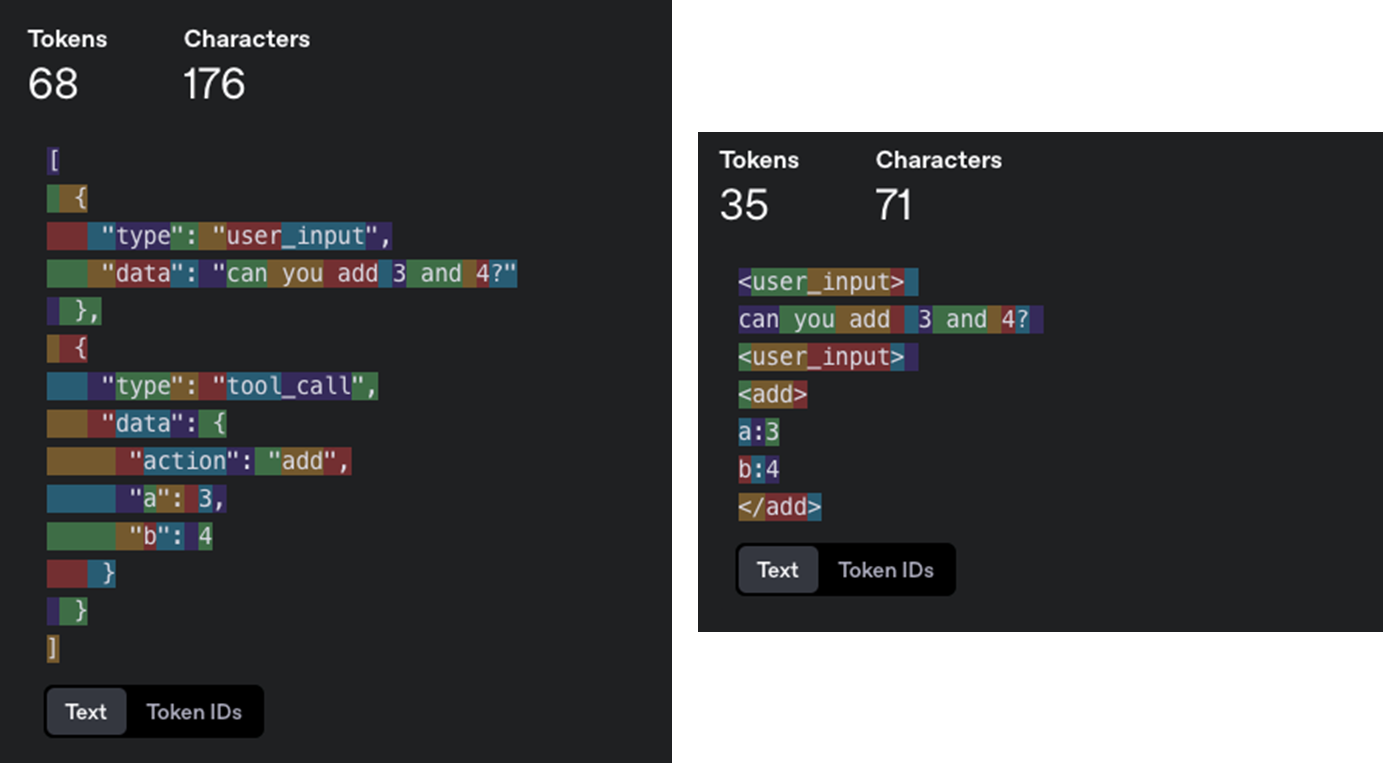
The XML-style format demonstrates significant token savings while maintaining clarity and structure. This efficiency becomes critical when dealing with longer workflows or when you need to maximize the useful information within your context window limits.
💡 the point is you can build your own format that makes sense for your application. You'll get better quality if you have the flexibility to experiment with different context structures and what you store vs. what you pass to the LLM.
The Context Length Challenge
As tasks become more complex and require more steps, context windows grow longer. Longer contexts create a fundamental problem: LLMs are more likely to get lost or lose focus as context grows. This leads to degraded performance, unreliable outputs, and failed workflows.
The solution: Keep workflows focused and context windows manageable (3-10 steps, maximum 20). This constraint ensures high LLM performance while handling complex tasks through well-orchestrated smaller agents.
This focused approach remains valuable even as LLMs improve. As context windows become more reliable, your focused agents can naturally expand their scope to handle larger portions of your workflow.
Benefits of Manageable Context
- Better Performance: Smaller context windows mean higher-quality LLM outputs
- Clear Responsibilities: Each agent has well-defined scope and purpose
- Improved Reliability: Less chance of getting lost in complex workflows
- Easier Testing: Simpler to validate specific functionality
- Faster Debugging: Easier to identify and fix issues when they occur
Why own context window?
Key benefits of owning your context window:
- Information Density: Structure information in ways that maximize the LLM's understanding
- Error Handling: Include error information in a format that helps the LLM recover. Consider hiding errors and failed calls from context window once they are resolved.
- Safety: Control what information gets passed to the LLM, filtering out sensitive data
- Flexibility: Adapt the format as you learn what works best for your use case
- Token Efficiency: Optimize context format for token efficiency and LLM understanding
- Context includes: prompts, instructions, RAG documents, history, tool calls, memory
Remember: The context window is your primary interface with the LLM. Taking control of how you structure and present information can dramatically improve your agent's performance.
3. Simplify tools and workflows
Tools are just structured outputs
Tools don't need to be complex. At their core, they're just structured output from your LLM that triggers deterministic code.
For example, lets say you have two tools CreateIssue and SearchIssues. To ask an LLM to "use one of several tools" is just to ask it to output JSON we can parse into an object representing those tools.
class Issue:
  title: str
  description: str
  team_id: str
  assignee_id: str

class CreateIssue:
  intent: "create_issue"
  issue: Issue

class SearchIssues:
  intent: "search_issues"
  query: str
  what_youre_looking_for: str
The pattern is simple:
- LLM outputs structured JSON
- Deterministic code executes the appropriate action (like calling an external API through MCP server)
- Results are captured and fed back into the context
Simplifying workflow
When building AI agents or orchestrating multi-step LLM workflows, you're often juggling two types of information:
-
current progress - What the agent is currently doing - What's the next step? Are we waiting for a tool call? Should we retry?
-
Workflow History - What the agent has done so far - A record of the workflow so far: user messages, tool calls, LLM completions, etc.
When you split state into two separate concepts, you have to:
- Maintain sync between them
- Serialize them separately
- Debug them separately
- Handle versioning edge-cases when one changes and the other doesn't
That's a mess. Especially in AI apps, where every retry or tool call involves juggling state transitions and memory windows.
By keeping one unified structure—your full state is always serializable, inspectable, and restartable.
✅ The Better Pattern: Everything is a Tool
Instead of switching between plaintext and tool calls, treat all actions — even messages to humans — as tool calls.
In today's LLM APIs, there's a fragile fork in the road:
Does the model respond in:
- Plaintext?- e.g. "The weather in Tokyo is 57 and rainy"
- Structured tool call? e.g. { function: "check_weather", args: {...} }
This first token ("the" vs "{" ) decides everything, and if it's wrong, your logic collapses. This is brittle and hard to control. And it's worse when you add human interaction to the mix.
| Feature | Why it matters |
|---|---|
| Clear Instructions | Model doesn't have to guess — everything is a tool call |
| Durable State | Can pause, resume, and rewind threads at will |
| Multiple Humans | Handle input from many people, asynchronously and reliably |
| Multi-Agent Ready | Extendable to agent↔agent requests with the same structure |
| Control Flexibility | Agent can initiate the conversation — not always the human |
| Testability & Introspection | Events can be logged and replayed like test cases |
The idea is to stop making the LLM choose between plain text and structured output, and instead use a consistent structure — where everything (even asking a human) is a tool call. This simplifies control flow, enhances reliability, and makes agents truly autonomous and collaborative with humans.
4. Own your control flow
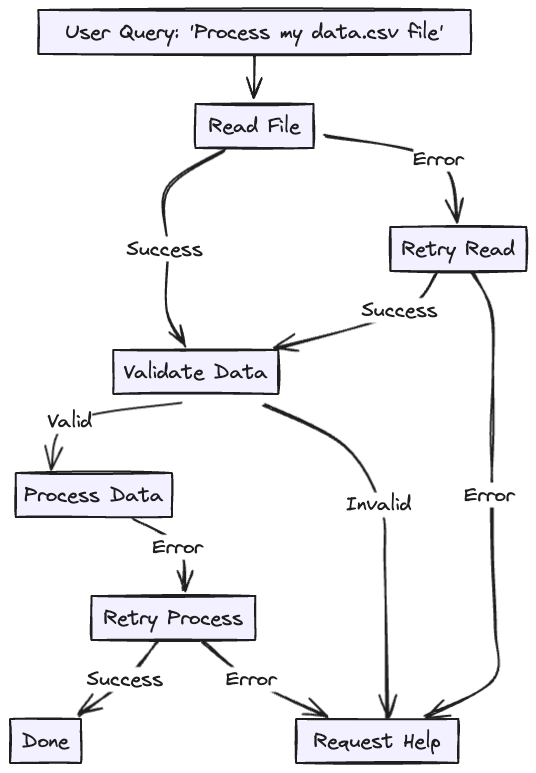
Build your own control structures that make sense for your specific use case. Specifically, certain types of tool calls may be reason to break out of the loop and wait for a response from a human or another long-running task like a training pipeline.
- summarization or caching of tool call results
- LLM-as-judge on structured output
- context window compaction
- logging, tracing, and metrics
- client-side rate limiting
- durable sleep / pause / "wait for event"
Control Flow Patterns (Examples):
- request_clarification
→ Model needs more info. Break the loop and wait for human input. - fetch_open_issues
→ Lightweight, sync step. Fetch data, append it to context, and continue loop. - create_issue (high-stakes)
→ Break the loop to wait for human approval before proceeding.
Without control flow :
- You risk blindly executing high-impact tasks
- You're forced to keep the entire task in memory (fragile)
- You either keep agents dumb or YOLO your way through dangerous ops
Self-Healing through Error Context
This one is a little short but is worth mentioning. One of these benefits of agents is "self-healing" - for short tasks, an LLM might call a tool that fails. Good LLMs have a fairly good chance of reading an error message or stack trace and figuring out what to change in a subsequent tool call.
💡 One if the powerful but often overlooked trick for making agents more robust: looping over failed tool calls by putting errors into the context window
- LLM proposes a next step
- You try to run that step with paramters
- If it succeeds, you save the result and continue
- If it fails, you:
- Log the error into the context
- Let the LLM see it on the next round
- Give it up to 3 tries (or whatever threshold you set)
- If it still fails, escalate (e.g. ask a human, reset part of memory, or quit)
⸻
Why This Works
LLMs are actually pretty good at reading stack traces and fixing things when the context is tight (short tasks). By letting them "see" the error in a structured way, they can change the inputs or retry differently.
Building Agents That Work in Production
The journey from demo to production-ready AI agents requires a fundamental shift in approach. While frameworks and abstractions offer quick wins for prototypes, real-world applications demand control, transparency, and reliability.
The four pillars we've explored—mastering prompts, engineering context windows, simplifying tools and workflows, and owning control flow—aren't just technical recommendations. They're the foundation for building agents that businesses can trust with critical operations.All of these work alongside the structured tool invocation with MCP to get agentic workflows that are both powerful and predictable—giving you the reliability of deterministic systems with the flexibility of AI decision-making.
What's Next?
While this post covered the conceptual framework for building controlled, production-ready agents, the real challenge lies in the implementation details. In our next post, we'll dive deep into the code—building an MCP client that can handle real-world complexity: multiple concurrent tool calls, validation failures, error recovery, and the debugging visibility you need when things go wrong.