(Part 3) Is Your AI Agent Using the Right Tools — or Just Guessing?
Why tool retrieval is important in your Agentic workflow and how to systematically improve it.
(Part 3) Is Your AI Agent Using the Right Tools — or Just Guessing?
As our AI system grows we need to coordinate multiple tools — from search documentation to querying databases to sending notifications on slack.
Where we fail is to ask the right question — How do you know if your agent is picking the right tools? What percentage are we failing?
In the previous blog , we talked about why we need fine grained control over our Agentic sytem. It allows us to measure and systematically improve individual parts of our Agent.
It's a common challenge. Your agent might have 20+ tools available, and without systematic testing, it's hard to tell if it's:
- Calling unnecessary tools (which wastes API calls and slows things down)
- Missing important tools (leaving tasks incomplete)
- Using tools in the wrong order (breaking your workflows)
The thing is, manual testing only catches so much. You might test a few scenarios, see that they work, and ship to production. But then you discover your agent is quietly making mistakes you never anticipated.
This blog will walk you through a practical approach to measure and improve your agent's tool selection using metrics that actually help you build better systems.
How are your agents failing ?
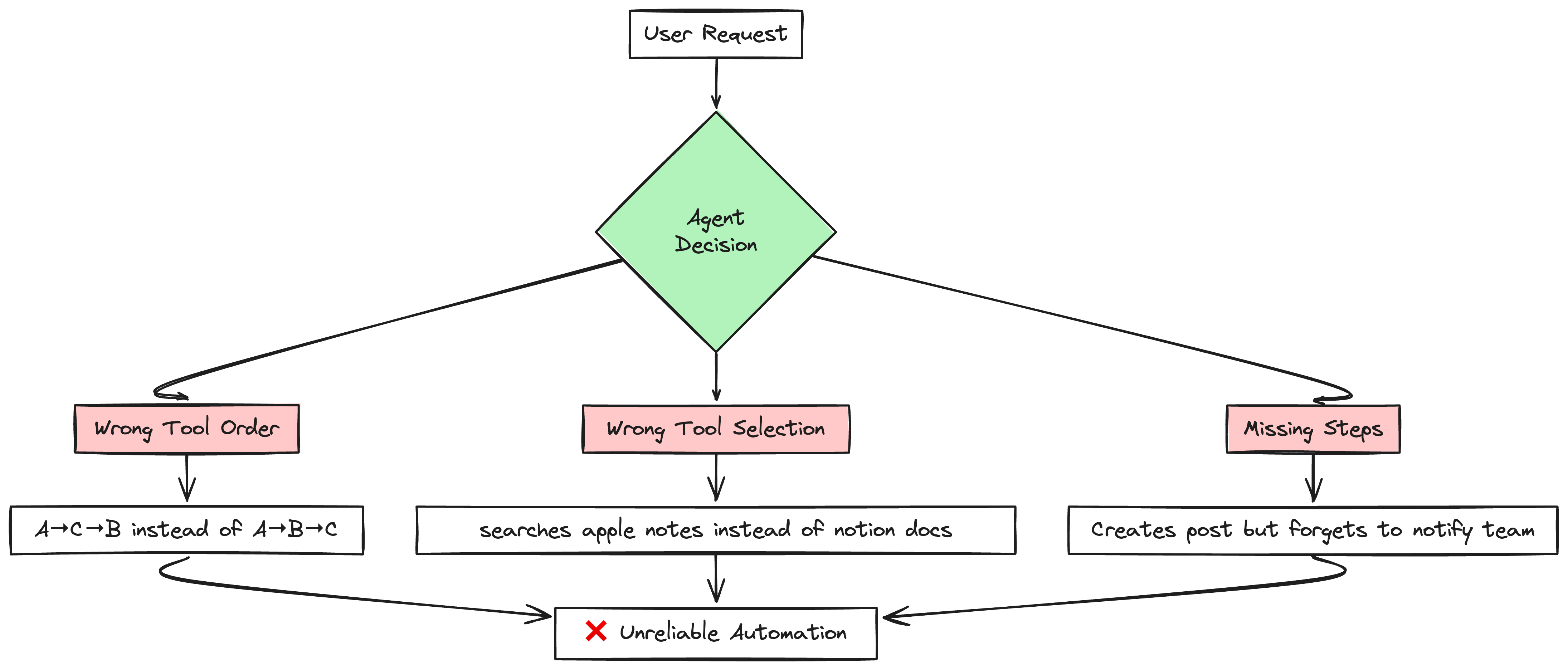
Tools Called in Wrong Order
What I wanted - Agent calls Tool A → Tool B → Tool C in that exact order.
What happened: Sometimes A → C → B, sometimes it skipped B entirely, sometimes it called A twice
Wrong Tool Selection
I have 15+ tools in my system.
The problem: The agent can't figure out which tool to use.
For example, I have three note-taking tools:
Obsidian (for deep thinking and research)
Apple Notes (for quick, temporary notes)
Notion (for planning and tracking)
When I ask "Find my pizza recipe," the agent should use Apple Notes. But it often picks Obsidian instead, wasting time searching through thousands of research documents.
Missing Steps in Complex Tasks
User request: "Create a release post and notify the engineering team"
What should happen:
- Create the post in Confluence
- Find the #engineering channel
- Send notification message
What actually happens: Agent creates the post but forgets to notify the team. Or it sends a message to the wrong channel.
Evaluation metrics
We want to evaluate how well our model performs when it comes to calling tools. In order to do so, we'll be using two main metrics:
- Precision: Precision tells us what fraction of the tools we called were actually useful. A high precision means we avoid wasting resources on calling irrelevant tools.
- Recall: Recall tells us what fraction of the relevant tools we actually used. A high recall means we're not missing important steps that the user needs.
Balancing these 2 metrics is critical. If we only focus on recall, the model might call too many tools—most of which are unnecessary. If we only focus on precision, then we might miss out on potential tools that the user needs.
# Tools that our model called
model_tool_call = [
    "GET_CALENDAR_EVENTS",
    "CREATE_REMINDER",
    "SEND_EMAIL",
]


# Tools that we expected our model to call
expected_tool_call = [
    "GET_CALENDAR_EVENTS",
]

precision, recall = (
    calculate_precision(model_tool_call, expected_tool_call),
    calculate_recall(model_tool_call, expected_tool_call),
)

print(precision, recall)
##In this example, the model called three tools but only one was ##correct. Hence:
##- **Precision** = 1 correct / 3 total called = `0.33`
##- **Recall** = 1 correct / 1 expected = `1.0`
What we want to do is to maximize precision while keeping recall high. This means that we ideally want to make sure that all of our tools called are relevant while making sure that we call as many of the relevant tools as possible. This is quite distinct from RAG where we want to maximize recall while relying on the model's ability to filter out irrelevant information.
Identifying Failure Modes
When deciding which apps/tools to call, two main pitfalls emerge:
1. Lack of Context
Users operate multiple note-taking apps (Notion, Obsidian, Apple Notes). Without explicit context—e.g., that Apple Notes is only for quick, ephemeral tasks—our model might choose the wrong note-taking tool, leading to confusion and incorrect data storage.
Let's imagine we have four tools that we want to evalute
obsidian.searchapple-notes.searchnotion.searchconfluence-search.people
The MCP server tools would look something like this :
@mcp.tool()
def obsidian_search(query:str):
  """Simple search for documents matching a specified text query across all files in the vault. """
  return text


@mcp.tool()
def apple_search(query:str):
  """Search for notes by title or content """
  return text


@mcp.tool()
def notion_search(query:str):
  """Search pages or databases by title in Notion """
  return text
The model selects one of the tools for a user query based on the tool description.
Without much context or description, we might expect our model to get confused.
For instance it's perfectly valid for the user to call apple-notes for every single note they take, thus ideally never calling any other tool. Without appropriate user context the LLM will not be aware of the that.
This is a problem if we don't incorporate our user behaviour into the LLM decision making.
Say, our user has the following behaviour:
- He uses Obsidian for personal notes and reflections on a wide range of topics
- He uses Apple notes for quick notes that are more one-off. Examples of these notes includes recipes, shopping lists, notes about a movie we want to watch, things to note down etc, todo lists, reminders etc
- He uses Notion for planning trips, tracking expenses and other forms of long term planning.
- He uses Confluence for company documentation, posts and notes.
We can see a simple example
queries = [
    [
        "Find my pizaa recipe",
        ["apple-notes.index"],
    ],
    ["What did I write about RAG systems previously?", ["obsidian.searchNoteCommand"]],
    [
        "Does John sit on the product or engineering team?",
        ["confluence-search.people"],
    ],
    [
        "Where are we staying in Japan on 15-18th August 2025?",
        ["notion.search"],
    ],
]
After we run this by our LLM it , we get
| Query | Selected Tool | Expected Tool |
|---|---|---|
| Find my cheeseburger recipe | ['obsidian.searchNote'] | ['apple-notes.index'] |
| What did I write about LSTMs previously? | ['obsidian.searchNote'] | ['obsidian.searchNote'] |
| Does Sarah sit on the product or engineering team? | ['confluence-search.people'] | ['confluence-search.people'] |
| Where are we staying in Japan on 15-18th January 2025? | ['google-search.index'] | ['notion.search'] |
Without any context, our model struggles to decide what the right tool to be called is in response to the user request. In our four examples above, it only gets two of them right. This is an indication that for our model to be able to call the right tool, we need to provide it with more context.
2. Multi-Step Tasks
Some user requests require calling multiple tools in sequence or in parallel (e.g., create a new release post, then ping the #engineering channel). Our model might forget one step or mix up the order.It becomes even more challenging when user context is required in selecting the tools
For. e.g
Send bobby a message that we're going to be late for spin class later

Create a new release page about our latest deployment and ping the #engineering team to get started filling in the details:

Find the latest customer feedback about our mobile app and create a summary document

Now it can go wrong if the LLM choose the wrong tools or wrong order or miss any tool or all of them.
We want our test prompts to systematically surface these weaknesses, allowing us to measure how reliably the model navigates them
| query | selected_tools | expected_tool | |
|---|---|---|---|
| 0 | Let's start scaffolding out a new release post about our latest deployment. Also send a message the #engineering channel to tell them to fill it up | [confluence-search.new-page, microsoft-teams.sendMessage] | [confluence-search.new-blog, jira.active-sprints, microsoft-teams.findChat, microsoft-teams.sendMessage] |
| 1 | find weather taiwan dec and generate shopping list for it | [google-search.index, notion.create-database-page] | [google-search.index, apple-notes.new-note, apple-notes.add-text] |
We can see our model struggles with multi-step tasks.Not only do we care about choosing the right tools but also the right order to the tools
Systematically Improving Tool Calling
We have identified that our model struggles to call the right tool when user query requires some explicit content or multiple steps to be executed
Generating synthetic queries
When deploying RAG systems with multiple tools, we need confidence that our models will select the right tools for each user request. Manual testing misses edge cases and can't scale. By generating synthetic test queries that deliberately target potential failure modes - like selecting between similar tools or coordinating multiple steps - we can systematically identify and fix weaknesses in our tool selection logic.
We'll start by writing out a brief prompt and defining how our user uses these individual tools. We'll then randomly sample from our list of tools and use them to generate a list of queries that require the use of these tools.
These will then come in handy when we want to seed future generations of queries by allowing us to generate more diverse and unique queries.
Providing Contrastive and Positive Examples
In order to generate better queries, we'll also provide some examples of queries that use this specific command we've chosen and some examples of queries that don't. This in turn allows us to provide both positive and negative examples to our model so it sees a greater and more diverse set of examples.
We generate user queries for each tool based on the specific command and its usage. The prompt would look something like this:
messages=[
            {
                "role": "system",
                "content": """
                Generate a hypothetical user message that is about {{ length }} uses the following command and at most 2 more tools from the list of tools below.

                tool_name: {{tool.key}}
                description: {{tool.tool_description}}


                {% if positive_examples|length > 0 %}
                Here are some examples of how this tool is used

                <positive_examples>
                {% for example in positive_examples %}
                    <positive_example>
                        <query>{{ example["query"] }}</query>
                        <labels>{{ example["labels"] }}</labels>
                    </positive_example>
                {% endfor %}
                </positive_examples>
                {% endif %}

                Here are some examples of how other tools that don't use this specific tool are used

                <negative_examples>
                {% for example in negative_examples %}
                <negative_example>
                    <query>{{ example["query"] }}</query>
                    <labels>{{ example["labels"] }}</labels>
                </negative_example>
                {% endfor %}
                </negative_examples>

                Here are a list of other tools that you can use in conjunction with the above tool

                <tools>
                {% for tool in tools %}
                <tool>
                    <tool_name>{{ tool.key }}</tool_name>
                    <tool_description>{{ tool.tool_description }}</tool_description>
                </tool>
                {% endfor %}
                </tools>

                Here is a rough description of how our user uses the application

                <user_behaviour>
                {{ user_behaviour }}
                </user_behaviour>


                Consider the tool's purpose, its differences from other tools, and how it can be used with other tools based on the user's behavior.

                Once you've done so, remember to generate a user message that uses the tool in a way that is consistent with the user behaviour listed above and is written in the imperative as an demand/request.

                Invent and add specific and realistic details to the query where possible to make it more specific and interesting.

                Here are some sample details that you should avoid reproducing
                <bad details>
                repo 123
                jira #123
                </bad details>

                Here is an example of a good detail - it's a feasible detail that would be used in a real world scenario
                <good details>
                supabase/go-sdk
                jira 10023
                </good details>

                Do not copy these details, instead generate your own realistic details that would be used in a real world scenario
                """,
            },
We can calculate precision and recall for each of generated queries and make it as our benchmark
| ID | Query | Expected | Actual | Precision | Recall | Correct |
|---|---|---|---|---|---|---|
| 22 | any more prs or security alerts to worry about? | [github.unread-notifications] | [github.my-pull-requests, github.notifications] | 0.0 | 0.0 | N |
| 20 | open release notes for the latest release | [confluence-search.go] | [github.my-latest-repositories] | 0.0 | 0.0 | N |
| 21 | What did we discuss last week in the meeting with Nike? | [confluence-search.search] | [microsoft-teams.searchMessages] | 0.0 | 0.0 | N |
| 49 | did anyone comment on the pr for the performance fix? | [github.unread-notifications] | [github.search-pull-requests] | 0.0 | 0.0 | N |
| 23 | Just got approval for the Nike summer campaign we did, can u update the project status to approved...? | [confluence-search.add-text] | [confluence-search.search] | 0.0 | 0.0 | N |
| 24 | can you help me find the diagrams I did to show how docker containerisation works in my personal notes? | [obsidian.searchMedia] | [apple-notes.index] | 0.0 | 0.0 | N |
We can also calculate recall per tool :
| ID | Tool | Actual | Expected | Recall |
|---|---|---|---|---|
| 37 | microsoft-teams.findChat | 0 | 13 | 0.00 |
| 14 | github.unread-notifications | 0 | 5 | 0.00 |
| 5 | discord.findChat | 0 | 4 | 0.00 |
| 33 | obsidian.searchMedia | 0 | 4 | 0.00 |
And then investigate individual tools to find out what is going wrong.
For. e.g
microsoft-teams.findChat: Our model is inconsistent with its decision to callfindChatorsendMessage. It never calls them together but instead only calls either one.obsidian.searchMedia: Our model doesn't quite know when to use searchMedia, instead it defaults to searchNotes as the default even when graphics are mentioned.
Our synthetic dataset revealed key weaknesses: models skip required setup steps or
default to general tools instead of specialized ones. We can use this information to improve our tool calling.
Few shot prompting
We can now use effective system prompts and few shot examples to improve the performance of our model's tool call to specifically address the issue we found out
- Show the Problem and Solution
Pick a specific task where the AI often struggles. Then create examples that clearly show the right way to handle it. These examples should closely match real situations the AI will face. - Use Real-World Examples
Avoid made-up or generic examples. Use real examples from your work, showing how different tools and steps come together. The more grounded in reality, the better the AI learns. - Keep Examples Simple and Clear
Make each example short and easy to understand. Focus on one main idea at a time so the AI doesn’t get confused. Clear, focused examples are more effective than complex ones. - Show Different Ways to Do Things
Give examples that solve similar problems in different ways. This helps the AI understand the variety of approaches and when each one is appropriate. - Focus on Common Mistakes
Pay attention to the patterns where the AI goes wrong. Create examples that address those specific errors and show the correct way to do things. This helps fix repeated mistakes.
We can compare this to our benchmark
| Metric | Baseline | System Prompt | System Prompt + Few Shot |
|---|---|---|---|
| Precision | 0.45 | 0.64 (+42%) | 0.79 (+76%) |
| Recall | 0.40 | 0.54 (+35%) | 0.84 (+110%) |
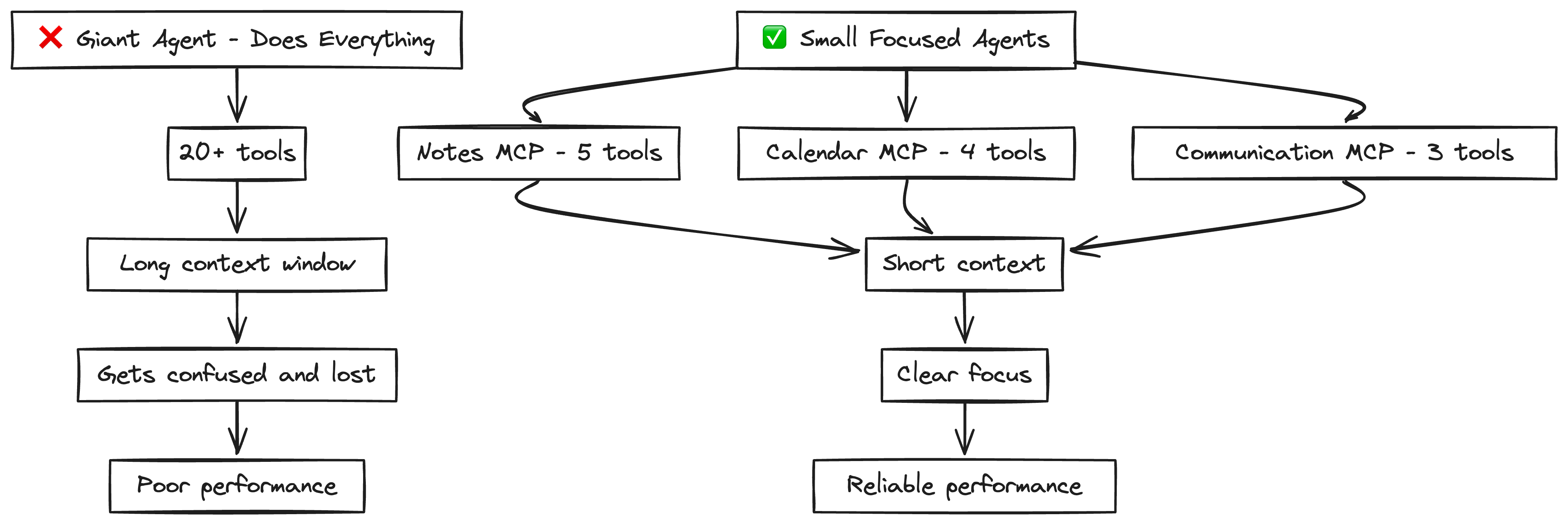
Small, Focused Agents
Don’t build one giant agent. Instead, build small, purpose-driven agents—each focused on specific domain with 3-10 tools.
Why? Because LLMs degrade with complexity. As tasks grow longer, the context window stretches, and LLMs start to lose track—leading to skipped steps, wrong tools, or messy execution.
As agents and LLMs improve, they might naturally expand to be able to handle longer context windows. This means handling MORE of a larger DAG. This small, focused approach ensures you can get results TODAY, while preparing you to slowly expand agent scope as LLM context windows become more reliable.
Key Takeaways
- Measure everything: Use precision and recall to track tool selection performance
- Test systematically: Create test queries that target your agent's weak spots
- Add context: Tell your agent how YOU use each tool
- Show examples: Few-shot prompting dramatically improves performance
- Start small: Build focused agents rather than trying to do everything at once
Building reliable AI agents isn't about luck - it's about systematic measurement and using data to guide your improvements. Whether you're working on tool selection, retrieval systems, or any other AI feature, this methodical approach will help you build better, more reliable systems that users can trust.
Even if you fix your tool retrieval, your agent can still fail in unexpected ways — that’s where Human-in-the-Loop (HITL) systems come in. In the next post, we’ll explore how to add targeted human feedback loops to catch edge cases, guide learning, and create realiable AI systems that not only work, but keep getting smarter over time.